
Insights · Applications and data
Spreadsheet vs database: choose for the work.
Decide whether a shared workflow needs a better workbook, an existing product or an application with stronger operational controls.
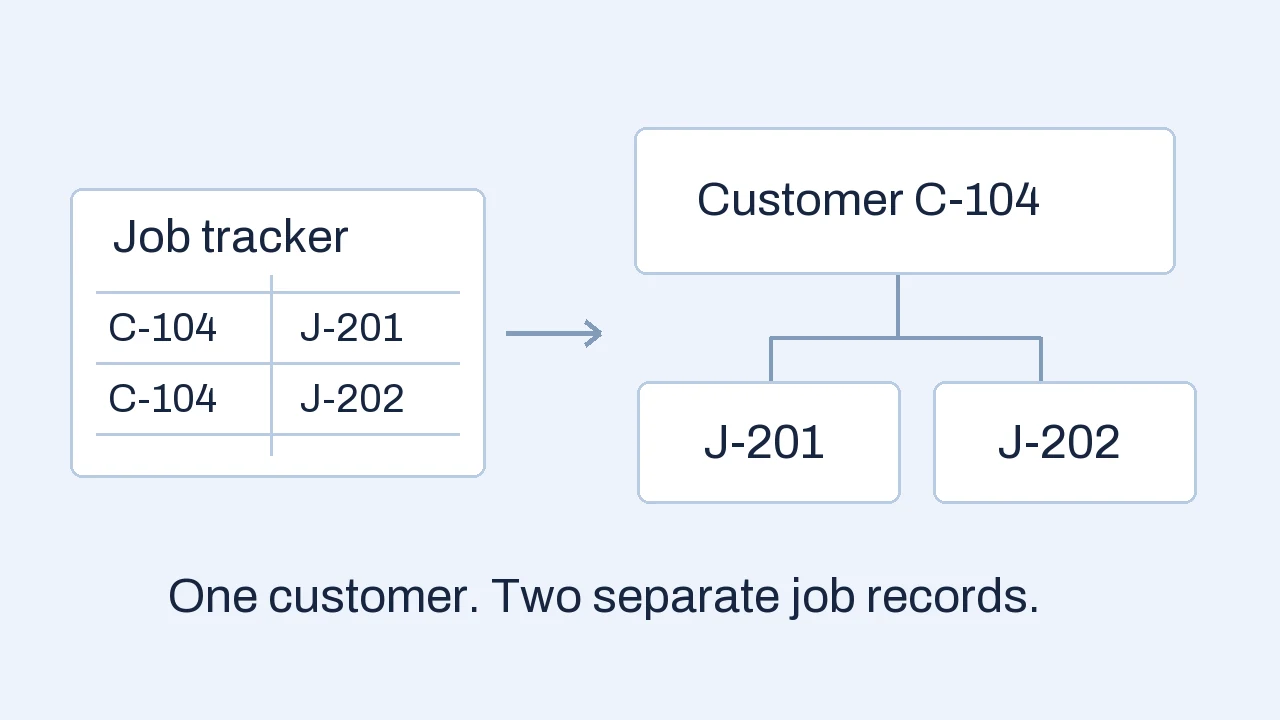
The spreadsheet vs database decision depends on how the work uses data. Spreadsheets offer flexible calculations and analysis. A database can support structured, related records and configured integrity rules for an operational workflow. Compare permissions, shared updates, history and system connections before deciding to move; row count alone is a poor trigger.
A shared job tracker makes the difference concrete.
A service team uses a workbook for customers, scheduled jobs and completion notes. The same customer appears on several rows. When their contact details change, someone updates one row and misses another. A technician needs to update a job from a phone, while pricing should remain visible only to the office.
This illustrative example uses invented customer and job references. The issue is not that the workbook crossed a magic row count. The team needs agreement on which details are shared, which belong to a historical job, and who can change each part.
Current contact details
Update the current phone number once. Job screens can read it from this customer record.
Address used at service
Keep the agreed service address and completion record for this job.
Address for this booking
Confirm the location for the new job. A current address change does not silently rewrite J-201.
Relationships let records share current information. Historical snapshots preserve the facts that belonged to a specific event.
A relational database can store customers and jobs as separate, linked records. The team still needs an interface for scheduling and completion, access rules for each role, and a deliberate decision about history. Moving cells into tables does not make those decisions automatically.
Compare the controls your work actually needs.
A spreadsheet is a flexible grid for values, formulas and analysis. A database is a managed store of records; a relational database links tables through keys. Both can be part of the same workflow. The useful comparison is the behavior your process requires.
- Consistent records
- Spreadsheet: tables, validation and controlled templates can improve entry; their effectiveness depends on how the workbook is used.
- Database-backed workflow: defined field types, unique keys and constraints can enforce specific rules across supported write paths.
- Shared editing
- Spreadsheet: supported cloud tools can let people edit together. File format, versions and storage setup matter.
- Database-backed workflow: concurrent transactions can support shared updates. Conflicting edits still need handling in the application.
- Different permissions
- Spreadsheet: assess the actual file and platform controls. Hiding a column is not a reliable way to restrict access to its contents.
- Database-backed workflow: design and test which records and actions each role may access, including through exports and APIs.
- History and analysis
- Spreadsheet: formulas, charts and ad hoc scenarios are easy to explore; supported version history can help recover edits.
- Database-backed workflow: record-level change history and reporting can be designed around the process. Audit history and restoration still need explicit setup.
For the service team, test three things. Can a technician complete J-202 without seeing restricted pricing? Can the office change the customer’s phone without changing the completed job’s service address? Can two people update the same booking without silently losing an important edit?
Those answers are more useful than “we have 5,000 rows.” Data volume and formula complexity affect performance, but consequences, relationships and access needs can justify a different workflow even with few records. A large read-only analysis workbook may remain useful for much longer.
Keep the workbook when flexibility is the advantage.
Excel or Google Sheets can be the right place for a budget model, a short-lived planning exercise, a simple list with clear ownership or analysis of exported data. Changing assumptions quickly is often the point. A replacement application can make that exploration slower and more expensive to maintain.
Before commissioning a replacement, remove avoidable workbook problems. Use a consistent table structure, separate raw input from calculations, give important records stable IDs, add suitable validation and document what each status means. Decide who owns structural changes and how people should request them.
Check whether file-sharing problems come from sending copies around. Microsoft documents Excel coauthoring with supported versions and formats, using OneDrive or SharePoint Online. Validate your environment before assuming that several users require a database.
Protecting formulas can reduce accidental edits, but distinguish that from confidentiality. Microsoft explains the different protection levels and states that worksheet protection is not a security feature. Use appropriate file access controls, and assess a different interface where users must see only a restricted subset of operational data.
A well-owned workbook can be a deliberate choice. Keep it when the process remains understandable, the controls fit and the cost of errors is acceptable to the responsible owner. Revisit the decision when those conditions change.
What a database changes, and what you still have to build.
In the example, the customer record has one stable ID and each job points to it. This lets the system distinguish two customers with similar names, or two jobs for the same customer. A current phone number can be read from the customer record while a job retains the service-location snapshot agreed for that booking.
Configured database constraints can reject specific invalid states. For example, a unique key can prevent repeated job IDs, and a foreign key can require a job’s customer reference to exist. PostgreSQL’s constraints documentation explains these mechanisms. A database does not infer the right customer or discover every incorrect business fact.
A transaction can group related database changes so they complete together or roll back together. PostgreSQL’s transaction guide describes this all-or-nothing behavior. It does not mean an action spanning a database, an ERP and a notification service automatically shares one transaction.
The rest of the operational system still needs attention: sign-in, authorization, forms, mobile behavior, validation messages, change history, backups, restoration and support. A no-code product may supply much of this, but its permissions and workflow behavior need testing against your requirements.
For two people editing the same booking, decide how conflicts should appear. The application might check whether the record changed since it was opened and ask the second user to review the newer version. Shared database access alone is not a promise that the last edit is the correct one.
A useful mobile interface should expose the technician’s next action and essential details without requiring sideways navigation across a large grid. Test it with realistic notes, attachments and connection conditions. The stored data model and the user’s screen are separate design responsibilities.
Pick a practical path before commissioning an app.
- 01 · Improve
Keep the workbook
Fit is good; inconsistent entry, copies or unclear ownership are the main problems. Standardize and retest.
- 02 · Configure
Use an existing tool
Your ERP, CRM, field-service product or no-code platform can meet the workflow and permission requirements.
- 03 · Build
Scope a focused app
An important process still needs a different interaction, rule or connection. Define that gap and its operating owner.
Test existing products with the same customer-and-jobs example. Include a restricted user, a changed address and a conflicting update. A polished demonstration with an administrator account does not establish what a technician can safely do.
The custom software versus off-the-shelf guide explains how to compare configuration, a new product and a custom component. For the custom path, the software cost guide helps separate the first workflow from migration, connections and ongoing responsibility.
Our custom business application service can turn a defined operational gap into a focused interface with appropriate records, rules and handoffs. The starting point is a process and the control it lacks, rather than recreating every workbook tab as a screen.
Move one workflow and prove it works.
Inventory the fields people actually use, their owners and their meaning. Identify formulas that encode decisions, hidden reference lists, duplicate customer records and manual steps performed outside the file. Agree which history must be retained before cleaning or transforming it.
Prototype one complete task, such as scheduling and completing a service job. Check it with the office and technician roles on desktop and phone. Define what happens if a booking changes while someone has it open, or a user loses access midway through a task.
For a trial migration, reconcile record counts, stable references and meaningful totals. Inspect exceptions rather than assuming that matching row counts prove matching data. Test backup restoration and retained access to historical records. Set a cutover point and make it clear which system accepts new updates afterward.
If records must also reach the ERP, treat that connection as its own acceptance boundary. Our ERP integration guide covers ownership, duplicate prevention and recovery. Excel can remain an analysis tool fed by controlled exports even when operational updates move elsewhere.
A successful move gives the team a dependable way to perform the work and resolve exceptions. Measure less rekeying, fewer unresolved corrections or clearer ownership against a documented starting point; do not assume a new database alone creates those outcomes.
Frequently asked questions
When should a business move from a spreadsheet to a database?
Consider a move when required relationships, permissions, consistent updates or connected workflows cannot be managed reliably in the current setup. Assess existing workbook features and products first. There is no universal row count that makes an application necessary.
Can several people edit Excel at the same time?
Yes, supported Excel environments provide coauthoring. Microsoft documents the required versions, formats and cloud storage setup. Check the actual environment before treating shared editing alone as a reason to replace the workbook.
Is a database automatically more secure than a spreadsheet?
No. Access controls, application authorization, configuration and operating practices determine what users can see and do. Worksheet protection is not a confidentiality control. A database-backed workflow still needs tested permissions, protected credentials and appropriate backups.
Do users need to learn SQL to use a database-backed application?
Usually the application provides forms, search and task screens so operational users do not write queries. A no-code product can also provide an interface. Designing and maintaining the data model and its controls still requires ownership.
Apply this to your workflow
Which workbook has become an operational bottleneck?
Describe the task, who edits the data and which errors or access limits matter. A redacted workbook structure and one awkward update help assess whether to improve, configure or build.
Discuss your spreadsheet workflow How we deliver custom business applications