
Insights · Connected systems
ERP integration challenges: follow one order through.
Follow one order across systems to understand field ownership, duplicate prevention and recovery when the result is uncertain.
ERP integration challenges usually involve data meaning, record ownership, system limits and recovery when a transfer fails or only partly succeeds. A reliable connection needs to establish which business action completed, preserve the intended record identity and give people a clear way to resolve exceptions. Sending data successfully is only one part of that work.
One order, two systems and an uncertain result.
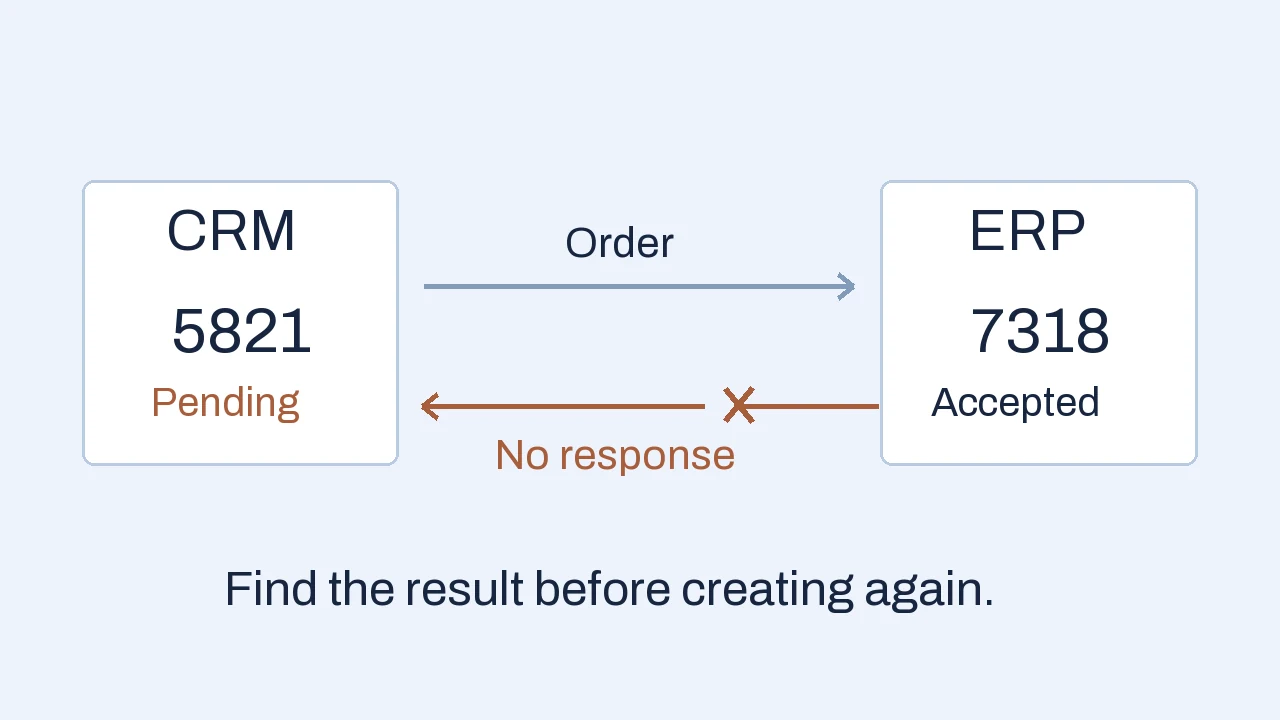
A sales coordinator approves order CRM-5821. The integration sends it to the ERP, which creates sales order SO-7318. The connection drops before the response reaches the CRM. The coordinator sees an error and clicks again. Without a way to identify the first attempt, the second click can create a second order.
This is an illustrative scenario with invented references. It shows a common design question: a failed response does not establish whether the business action failed. The integration needs to preserve the intended order identity and establish the outcome before repeating a write.
- 01 · Source
Ready to send
Keep CRM-5821 and its approved version with the outbound request.
- 02 · ERP
Order accepted
SO-7318 exists, but the response is lost. The CRM cannot yet confirm that result.
- 03 · Recovery
Reconcile first
Find the existing order by the supported external reference before another create attempt.
The user sees “confirmation pending,” with an owner and next check. Completion is established from the ERP record, rather than inferred from a sent request.
ERP integration means connecting the ERP with another application or process so records and actions move between them. This guide focuses on that connection. Replacing the ERP, migrating every department and redesigning the whole business are larger projects with different scope.
Agree which system owns each field.
Two systems can both say “customer” while referring to different records. A company name is a useful label, but it is a poor identity key: spelling, branches and trading names can differ. Map the CRM customer reference to the correct ERP account and verify that the delivery location belongs to the intended account.
For the sample order, agree a small ownership map before building the connector:
- CRM owns the submitted request
- Sales contact, requested delivery date, source order reference and the approved request version.
- ERP owns its commercial records
- ERP account and item IDs, applicable credit status, accepted sales-order number and fulfillment status.
- The integration owns the handoff record
- Source-to-destination references, mapping version, attempt history, current outcome and next recovery action.
Ownership should be agreed field by field where the consequences matter. Decide whether the CRM supplies a requested price or an already-authorized price, which system validates it, and what happens if the ERP disagrees. Avoid a generic two-way sync that lets either system overwrite the other without rules.
Item mapping also needs meaning. Twelve individual units are not necessarily twelve cases. Confirm item IDs, units of measure, conversion factors, currency, rounding, tax treatment and required fields with the process owner. Unknown values should enter an exception queue rather than receive plausible defaults.
Preserve the address used for the accepted order where history requires it. A later update to the customer’s current address should not silently rewrite where an earlier order was meant to ship. This is a business rule to model explicitly.
Separate rejected, delayed and unknown outcomes.
A single “sync failed” message hides several different decisions. The recovery path should depend on what is known about the destination action.
- Rejected
Invalid item code
The destination explicitly rejects the request and confirms no order was created.
- Delayed
Temporary limit
The service asks the integration to slow down or retry after a documented interval.
- Outcome unknown
Response timed out
The order may already exist. The transport failure alone cannot settle that question.
Idempotency means repeating the same intended request does not produce an additional business effect. Amazon’s explanation of safe retries describes using request identifiers to support this behavior. The exact mechanism depends on the receiving API; adding a reference field by itself does not make an arbitrary create endpoint safe.
As a product-specific example, Dataverse supports upsert with record keys to create or update a record. That is a useful capability to assess, rather than a universal ERP feature. Check whether an update could retrigger downstream actions, what uniqueness the destination enforces, and how changed payloads are handled.
Rate limits are another distinct condition. Dataverse documents a Retry-After value with Web API service-protection responses. Follow the actual provider’s guidance and keep retries bounded. A queue that keeps retrying forever can hide orders that still need a human decision.
Plan for partial success and later changes.
An ERP may accept an order header and reject one line, or save the document while a later release step fails. Determine whether the API treats the intended operation as one transaction or several. The user needs to see which business steps completed and which remain open.
For CRM-5821, an accepted order number is evidence of creation. It is not evidence that stock is reserved, credit is cleared, the order is released or goods are shipped. Choose an explicit completion boundary for the first integration and display later states separately.
Keep the source version and destination reference for each completed stage. If a line needs correction, recover that stage using a verified update or review action. Blindly resending the whole order can duplicate valid lines or undo an operator’s correction.
Later changes deserve their own rules. Decide how cancellations, revised quantities and older events are handled after release. A delayed “ready” event must not reopen a canceled order. The integration should recognize event identity and sequence where supported, and route ambiguous conflicts to review.
The order entry automation guide covers the earlier step of reading a customer purchase order and checking it before creating an ERP draft. Keep those source checks distinct from proving that the destination accepted the intended record.
Choose timing and connection method by the job.
Specify how fresh each piece of information must be. An order acknowledgment may need a prompt response; a management report may tolerate a scheduled update. Show a last-confirmed time where a delayed stock or status view could affect a decision. “Connected” should not imply that every displayed value is current to the second.
Start with supported native connectors and existing ERP capabilities. An integration platform can help coordinate several flows, mappings and monitoring, but it still needs the same ownership and recovery rules. A custom adapter may fit an unusual process or unsupported edge. A controlled file import can be a sensible first boundary when APIs are limited and the operational delay is acceptable.
Check the exact system version, permitted read/write operations, licensing, sandbox access, volume limits and change notifications. Test the real operations, including searches needed for reconciliation. A connector logo establishes far less than a successful end-to-end order test.
AI may help suggest a mapping or explain an exception, with review. Stable identity, amount calculations and authorization should rely on defined rules and supported system behavior. An uncertain account match should not become a confident ERP write.
Give people a recoverable workflow.
Name a business owner for rejected records and a technical owner for connection failures. Give them a shared view of the source reference, destination reference if known, failure category, last attempt and next action. A raw API error without an accountable next step leaves staff doing detective work.
Use access limited to the operations the integration requires. Store credentials through the chosen platform’s supported secret controls and keep sensitive payloads out of routine logs. Record enough evidence to investigate a failure while limiting who can view customer and commercial details.
Plan for changes after launch: a renamed ERP field, new mandatory code or modified workflow can break an otherwise working connection. The handover should identify configuration ownership, monitoring, release checks, recovery instructions and the route for vendor changes.
Our ERP integration services cover mapping, controlled transfers and recovery around the actual workflow. Useful scope includes what the business will see when an order cannot complete, alongside what happens on the successful path.
Make the pilot prove completion.
Start with one direction and a bounded order type. Test a normal order, an unknown account, a wrong unit, a repeated event, a timed-out response after acceptance, a rejected line and a cancellation arriving out of sequence. Write the expected record and user-visible state for each case.
Then reconcile source orders against accepted destination orders. Investigate missing and duplicate references, compare relevant line values, and check the oldest unresolved item. Count business completion separately from requests sent or jobs marked green.
Agree when automation pauses and how operations continue during an outage. A small, observable handoff with a usable recovery path gives a stronger basis for expansion than adding more systems before the first flow is dependable.
Frequently asked questions
What are the main ERP integration challenges?
Common challenges include inconsistent identifiers and units, unclear field ownership, limited interfaces, timing differences, duplicate events, partial writes and recovery. People also need clear responsibility for rejected data, system failures and changes after launch.
How do you prevent duplicate ERP orders?
Use stable source references and the destination’s supported uniqueness or idempotency controls. Preserve request identity across retries and reconcile uncertain outcomes before creating again. Test repeated events and lost responses; a reference field alone does not make every API operation safe.
Does every ERP integration need real-time synchronization?
No. Define how fresh each flow must be for its business decision. Prompt order acknowledgment may matter while reporting can use scheduled updates. Show the last-confirmed time where delayed information could mislead users.
Can integration work without a modern ERP API?
A supported connector, controlled file import or bounded adapter may be suitable, depending on the system and required delay. Verify read and write operations, permissions and recovery behavior. Limited interfaces can constrain what the first release should automate.
Apply this to your workflow
Which handoff still needs manual checking?
Tell us which systems exchange records, what should happen and one example that fails today. Redacted source and destination records help define mappings, exceptions and a useful first connection.
Discuss your system handoff How we deliver ERP integrations