CRM that fits your sales process
Keep opportunities, conversations and next actions together, with the fields and stages your team actually uses.
 Let’s talk
Custom applications & software
Your team should not need five spreadsheets to finish one job. We build browser-based business applications that bring your records, decisions and daily work together, with AI where it earns its place.
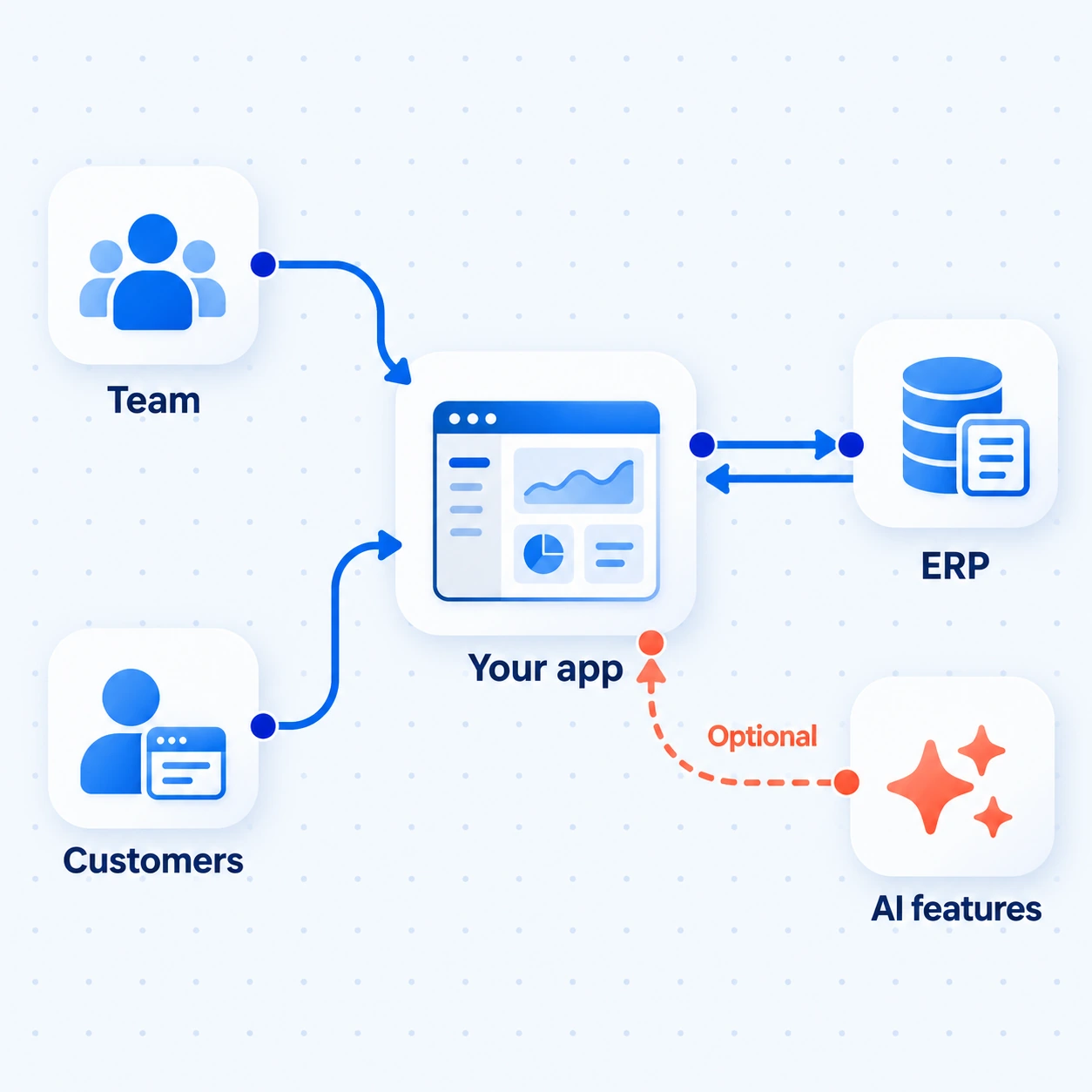
One workspace for your team and customers, connected to ERP records. AI features are optional.
Illustrative application architectureHow we deliver this service
We walk through a real task with its users, model the records and roles, then review a prototype together. We build the first complete journey in increments, connecting the systems and testing the rules behind each screen.
Our founder’s operations and business applications background helps us connect screens with the rules and handoffs behind them. We review working versions with your users, with senior technical oversight before delivery.
The experience behind our approachSee the work
Illustrative example · sample data, not client results.
A buyer receives two offers for 200 brackets. One is €12.40 per unit with a delivery date; the other is €12.10 with no date. Email and a comparison sheet leave the follow-up and decision in different places.
Fictional offers, both in EUR for the same quantity. Freight has not been confirmed.
Sample workspace · read-only
In the app, the buyer opens the RFQ, compares the same fields and checks the source files. AI can prepare the extracted fields; the buyer checks them and sees which terms still need an answer.
| Check | Offer A | Offer B |
|---|---|---|
| Unit price | €12.40 | €12.10 |
| Goods total | €2,480 | €2,420 |
| Delivery | 12 November | Not stated |
Offer A: 200 mounting brackets, BRK-20. EUR 12.40 per unit. Delivery: 12 November. Freight: to confirm.
Offer B: 200 mounting brackets, BRK-20. EUR 12.10 per unit. Delivery and freight: not stated.
Goods totals exclude freight. The missing terms still need checking before a supplier decision.
Sample workspace · read-only
The RFQ has one visible status, a task to request missing terms and a decision record. Once the terms are complete, the buyer can choose a supplier and submit the decision for approval.
Offers, follow-up and the eventual approval stay with the same RFQ.
Sample workspace · read-only
Step 1 of 3
AI can prepare the comparison. The buyer checks the terms, chooses the supplier and submits the decision for approval.
Where it helps
Keep opportunities, conversations and next actions together, with the fields and stages your team actually uses.
Collect offers, compare terms and record approvals in one workspace, with the original documents close at hand.
Manage orders or service requests internally, then give customers a useful view of progress without exposing the whole system.
What’s included
A working business application with custom screens, shared records, user roles and integrations, with AI features selected for useful tasks.
Design the records, views and next actions around the people doing the work. Review a prototype before building the first complete journey.
Build sign-in, permissions, status and business rules so staff, customers or suppliers see the part of the application they need.
Connect existing systems. Add document reading, search or drafting when it helps the task; conventional application logic handles the rest.
Build in reviewable increments with senior technical review. Test user journeys and access, then prepare deployment, documentation and ownership.
What you receive
Users can complete the agreed journey from input to outcome, with working roles, integrations, review states and understandable failure handling.
The first conversation
Walk us through one journey, from the first request to the final decision. We’ll discuss whether an existing product fits, what a first version needs and which dependencies need investigation.
The next decision: configure an existing tool, explore a prototype or scope a first release. A budget and schedule follow the work needed to define that scope.
Useful answers
We check existing products first. A custom build is worth considering when important rules, screens or connections keep forcing workarounds. The comparison includes ownership and maintenance, not only the initial build.
Yes. Start with one complete journey, such as submitting a request and getting it approved. A prototype helps check the experience; a first release also needs working data, roles and business rules.
No. Our custom AI development services add reading, search or drafting where useful. A conventional business application can be the right answer.
Yes, subject to its code, architecture and access. We review those before proposing changes or a rebuild.
User journeys, roles, migration, integrations and release requirements. We investigate those dependencies before proposing a phased budget and schedule.
We define sign-in, record access and data handling, then test access as well as normal journeys. Hosting, backups, code and account handover, and support responsibilities form part of the project scope. Specific compliance needs must be identified early.
An application is where people manage work. Automation moves work between steps and tools. A project can combine both, such as automated intake feeding a review application.
Let’s talk about your work
Start with the process that has outgrown its spreadsheet.
What we’ll discuss ↑← All services