Orders without the retyping
Read order details, match reference records and prepare a checked draft for the team to review.
 Let’s talk
Business processes & workflows
Still copying the same details from an email into another system? We connect the steps, check the information and route the exceptions, so your team can spend less time moving work along.
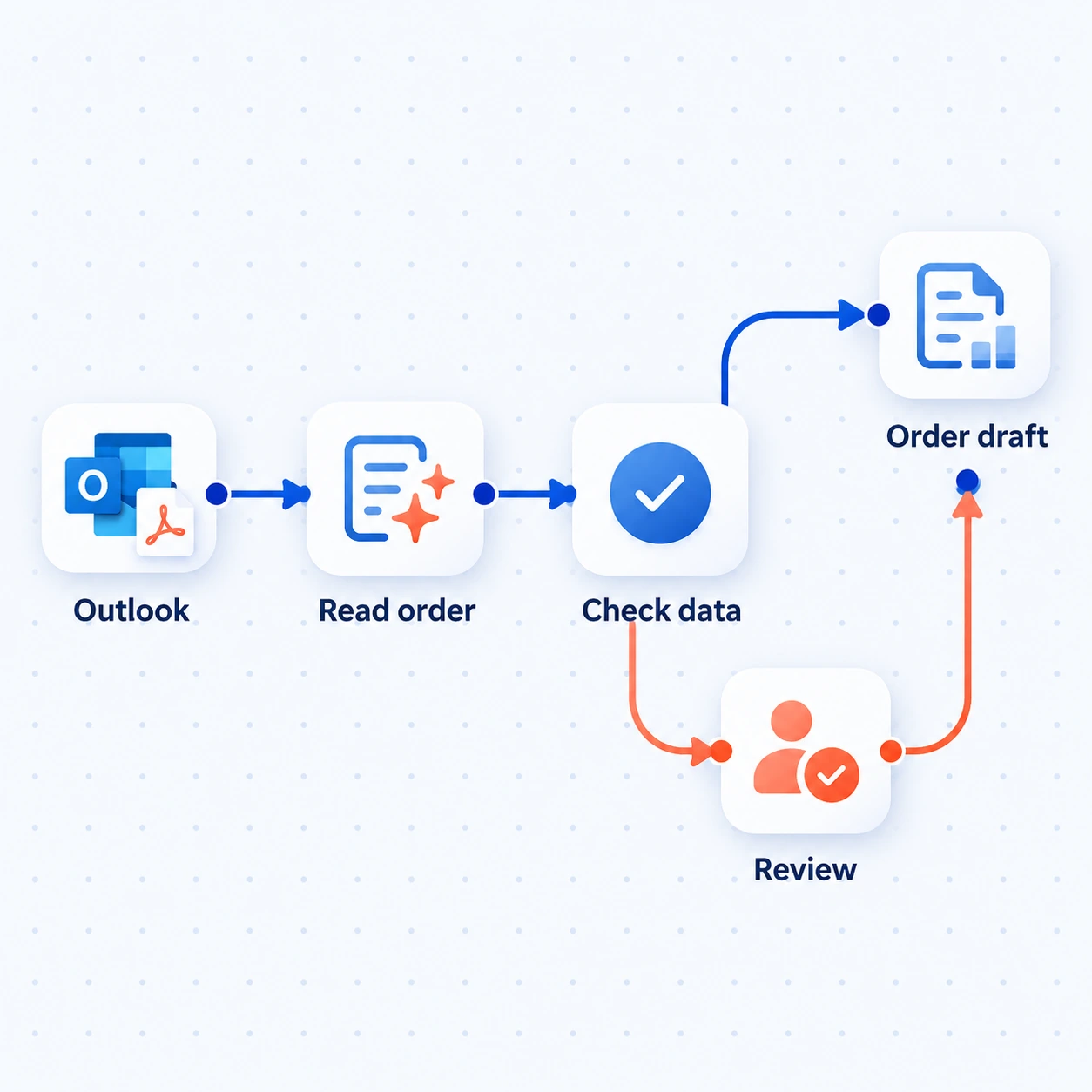
Read the order, check the data and send missing details to a person before the draft continues.
Illustrative workflow · Outlook shown as an example inputHow we deliver this service
We trace a real input from arrival to completion with the people handling it. Then we connect the routine steps, use AI for varied documents where useful and test incomplete inputs, duplicate requests and failed handoffs before introduction.
Our founder’s background combines operations and automation. We use that perspective to assess the work left with reviewers, the exceptions people handle and whether the complete workflow is easier to run. The scope covers automated steps and their handoff to people.
The experience behind our approachSee the work
Illustrative example · sample data, not client results.
A purchase order arrives for 200 brackets at €12.40 each. The customer and item can be matched, but the document has no delivery date. Someone currently reads the PDF and enters the details manually.
This is the input the team would otherwise read and enter by hand.
Sample workspace · read-only
The workflow reads the attachment, extracts the fields and checks them against customer, item and required-field rules. A missing date creates a review task with the original PDF attached.
AI reads the document. Rules check required fields and reference matches; they do not invent the date.
Sample workspace · read-only
The order desk receives a prepared draft showing the checked fields and the missing date. ERP posting stays blocked until the date is confirmed and the required approval is recorded.
The source PDF and checked fields remain available to the reviewer.
Sample workspace · read-only
Step 1 of 3
The review task belongs to the order desk. Confirming the missing date and approving the order are still part of the work.
Where it helps
Read order details, match reference records and prepare a checked draft for the team to review.
Route purchase or service requests, show what is waiting and remind the responsible person under agreed rules.
Turn forms, supplier offers or invoice details into structured information, with a review path for missing or inconsistent values.
What’s included
A working workflow that preserves source documents, checks business rules and gives exceptions a clear owner.
Collect email, forms or documents. Use rules for structured inputs and AI extraction where layouts or language vary; retain the source.
Match reference records, validate required fields and identify duplicate inputs. Send missing or uncertain information to a person with a clear reason.
Route tasks, approvals and permitted updates through supported connections. Keep the next action and responsible person visible.
Record runs and failed handoffs, define safe retries and document recovery. Compare the workflow with the original process after introduction.
What you receive
The workflow handles agreed sample inputs, avoids duplicate work and makes missing fields, failed runs and approvals visible to the responsible team.
The first conversation
Show the incoming item, the steps people take and where work waits. We’ll separate straightforward rules from steps that need AI or a person, then identify a useful first workflow.
The next decision: which handoff to automate first, what access to check and how to measure the change. Missing baseline data becomes a discovery task.
Useful answers
No. Rules and connections suit predictable steps. AI workflow automation helps with varied documents or language; it still needs checks appropriate to the task.
RPA typically follows steps in an existing interface. Business process automation covers the wider workflow, including inputs, approvals and system connections. We assess supported APIs or connectors before automating clicks.
Look for repetition, accessible inputs and a clear owner. We compare handling effort, volume and exceptions. A process that changes constantly may need simplifying first.
We check interfaces, permissions and vendor restrictions. Email, a review screen and an ERP can form one workflow when those systems support the connection.
Compare the new workflow with a baseline: handling time, repeat entry, turnaround and exceptions. Include review effort so work has not simply moved into another queue.
We define ownership of failed runs, credentials and rule changes before handover. Maintenance can sit with your team or be scoped with us, with operating notes and an escalation route.
Let’s talk about your work
An email, document or approval trail is enough to start the discussion.
What we’ll discuss ↑← All services