CRM to ERP
Move the agreed customer or order details between sales and operations without creating competing versions of the record.
 Let’s talk
Systems & data
One order should not need entering three times. We connect your ERP with CRM, warehouse tools and business applications, so agreed information moves between systems and failed updates are easy to find.
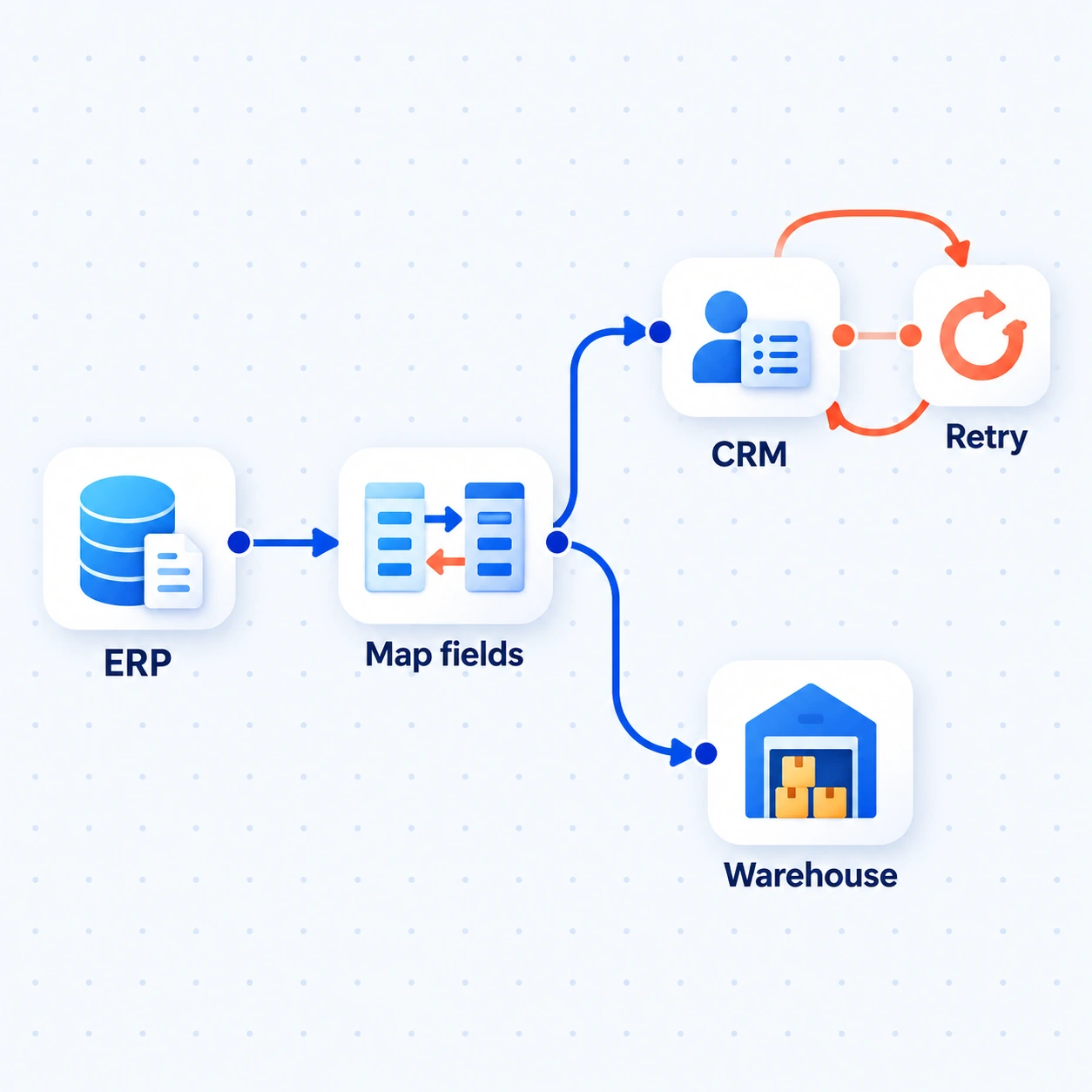
Map an ERP change into CRM and warehouse records. A failed CRM handoff can be retried without repeating the completed warehouse update.
Illustrative data flow · Update rules agreed in scopeHow we deliver this service
We work with your system owners to trace a business event, map identifiers and fields, and choose the source of truth. We build the supported connection, test failures and repeated updates, and define how someone monitors and recovers a handoff.
Our founder’s enterprise IT and Business Central integration background gives this work operational context: who uses a record, which version matters and what happens when systems disagree. We can also build the application or workflow around the connection.
The experience behind our approachSee the work
Illustrative example · sample data, not client results.
The ERP holds a confirmed order date, but sales sees the previous date in CRM. The CRM connection is temporarily unavailable.
The integration maps the ERP order to the CRM record, attempts the date update and records the failed handoff. It keeps a reference so a retry can target the same update.
Operations can distinguish the saved ERP change from the pending CRM update. After recovery, the connection checks the record and completes or escalates the handoff.
Step 1 of 3
The ERP is the date owner in this scenario. Actual ownership, retry rules and update timing depend on your systems.
Where it helps
Move the agreed customer or order details between sales and operations without creating competing versions of the record.
Share the required order, stock or fulfilment information using update timing that fits the work.
Connect incoming requests and status updates to the ERP, with record mapping and validation in between.
What’s included
Agreed records moving between systems, with clear field ownership, traceable updates and an exception route.
Map identifiers and fields, choose the source of truth and decide which changes travel in each direction.
Use APIs, connectors, events or controlled file exchanges. Check versions, vendor restrictions and available access.
Test repeated messages, missing references and interrupted transfers. Define how operators trace, retry or reconcile an update.
Show update status and useful alerts. Document mappings and responsibilities so changes can be maintained.
What you receive
Records map correctly, duplicate events do not create duplicate work, and failed or partially completed updates can be traced and resolved.
The first conversation
We’ll trace where the record starts, who owns each field and what the receiving team needs. Your system owners help confirm the available connection options.
The next decision: which connection to investigate first and what vendor access or mapping work it needs.
Useful answers
Usually we first assess the connection options in the existing system. ERP replacement is a wider decision, not an assumed prerequisite.
Some flows suit events; others suit scheduled transfers. Business timing, API limits and volumes determine the design and expected delay.
Check supported connectors, imports, exports or vendor-approved file exchanges. If there is no dependable route, we explain the limitation before a build.
Yes, as an input step that prepares fields or a proposed change. Business rules and permissions still determine which record update is allowed.
Let’s talk about your work
Start with one record that people keep entering or checking twice.
What we’ll discuss ↑← All services