
Insights · Purchasing controls
Purchase order approval workflow: rules that hold up.
Give every purchase a clear approval route, with limits, backup authority and a decision tied to the right order version.
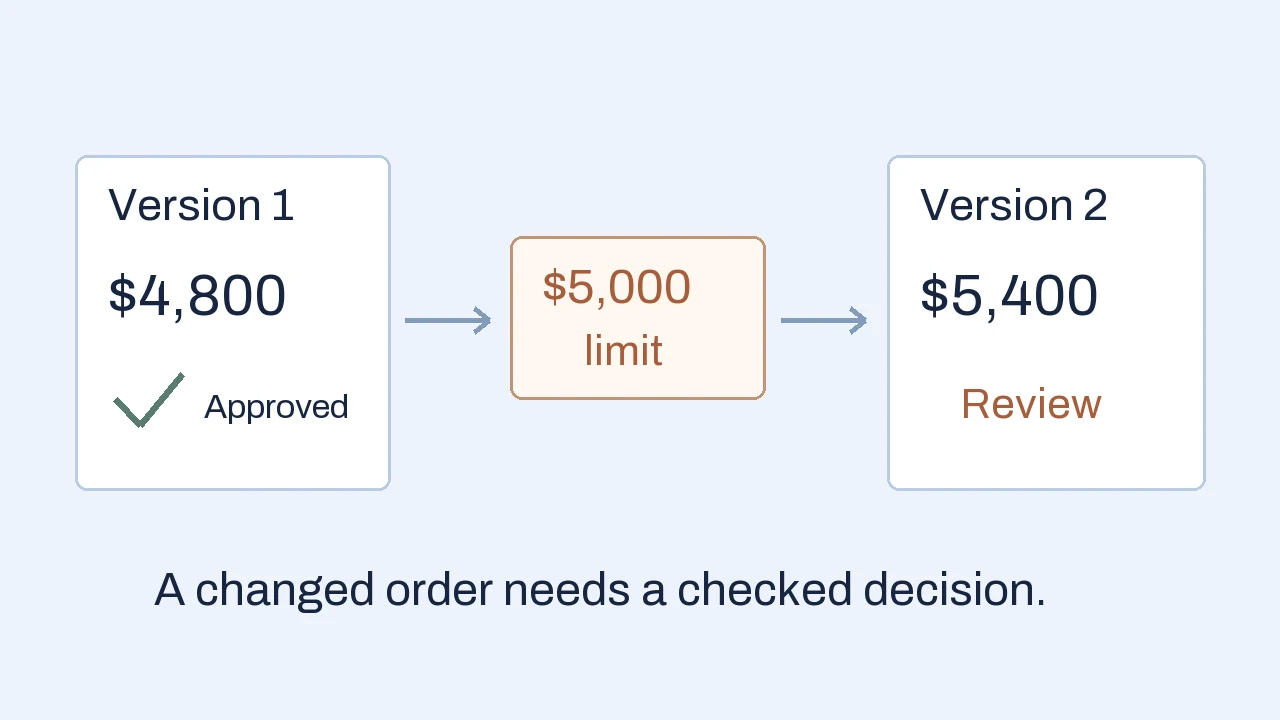
A purchase order approval workflow routes a proposed supplier order to the people authorized to approve its amount and risk before issue. A useful workflow records the version reviewed, applies clear approval rules, handles absences and changes, and shows whether the approved order actually reached the next system or supplier.
A changed order exposes the real approval rule.
A buyer prepares a purchase order for replacement parts. The department manager approves $4,800. Before the order goes out, the quantity changes and the total becomes $5,400. The old email still says “approved.” Which amount did the manager authorize, and who can authorize the new one?
This illustrative example uses an invented policy and sample amounts. Assume the manager can approve totals up to and including $5,000. Above that, finance must also approve. The approval applies to a recorded order version. Editing the order therefore creates a decision about reapproval rather than quietly inheriting the old answer.
- 01 · Version 1
$4,800 approved
Manager approval is attached to the original quantities, supplier and total.
- 02 · Version 2
$5,400 in review
The quantity change crosses the limit. The earlier decision stays in history.
- 03 · Release check
Wait for finance
Purchasing can issue version 2 only after its required approvals are complete.
An old notification must not approve a newer version. Show the revision and changed fields when the approver opens the request.
The practical question is whether the workflow can enforce that distinction. Faster notifications help, but the buyer also needs a dependable answer to “what is approved right now?” The same issue occurs when a supplier, delivery address, currency or commercial term changes without changing the total.
Define authority before you build the route.
A purchase order approval workflow needs a policy that the finance and operations owners can explain consistently. Start with a few real purchasing situations and write the expected decision for each. Then turn those decisions into routes, roles and tests.
For the example, a small matrix could look like this. These limits demonstrate routing logic; they are not recommended limits for your business.
- Existing supplier · total ≤ $5,000
- The department manager approves. Purchasing checks completeness and issues the approved version.
- Existing supplier · total > $5,000
- The department manager and finance approve. Define whether finance waits for the manager or reviews in parallel.
- New supplier · any amount
- Supplier verification is an additional condition. A low total does not bypass it.
Specify what “total” means: order currency, conversion date where relevant, tax, freight and other committed charges. An amount exactly equal to $5,000 must have one unambiguous route. Missing freight should remain an open question if it could change the route. Splitting one planned purchase into several smaller requests should not accidentally bypass the policy.
Separate the responsibilities behind the titles. The requester explains the need and supplies the budget reference. The manager confirms business need. Finance checks its defined budget and authority conditions. Purchasing confirms supplier and commercial details before issue. Decide whether a requester may approve their own request, and how conflicts are handled.
Risk-specific review can be more useful than another blanket approval layer. A software subscription may need an information-security review; an unfamiliar supplier may need verification. Name the condition and the reviewer’s decision. Avoid sending every order to every department simply because a routing tool makes it easy.
Make waiting and exceptions visible.
“Pending” should identify an owner and the next action. A useful queue shows the current approver, submission time, due date, missing information and escalation route. The requester should be able to see whether an order is waiting for a decision or has been returned for correction.
Define reminders and escalation separately. A reminder asks the same authorized person to act. Escalation moves the unresolved task to another defined person or supervisory route. Neither action should imply approval. Agree working hours and urgency before choosing timer values, so a weekend delay does not produce a misleading breach.
Delegation needs an authority check. A backup approver should have the right department, amount and category authority for the task. Record who delegated, to whom and for which period. If no suitable backup exists, leave the request visibly unresolved and alert its process owner.
Give “reject” and “request changes” distinct meanings. A rejection can close that submission with a reason. A correction request returns specified fields to the requester and leads to a new version. An urgent purchase needs an explicit exception route with an accountable decision; an overdue request should not become an automatic yes.
AI can help summarize a long justification or identify missing information. The approved policy, authenticated approver and recorded decision should determine authority. A model’s summary is useful context, and the approver still needs access to the underlying request and documents.
Keep approval separate from issuing the order.
Internal approval, creation of an ERP record, dispatch to the supplier and supplier confirmation are different events. Your chosen system may use different status names, but the workflow should tell users which event has actually happened.
For example, Microsoft’s Dynamics 365 Supply Chain Management documentation distinguishes approval and confirmation and describes configurable reapproval rules when change management is enabled. This is product-specific behavior, so check the settings in your own environment.
Before issue, compare the current version with the approved snapshot. Keep the request ID, revision, supplier, line items, totals, attachments, decisions, reasons and timestamps together. If a material field changed, apply the agreed reapproval rule. A change log alone does not establish that the changed terms were authorized.
When the order is written to another system, show an unconfirmed handoff until a receipt or reconciliation establishes the result. Repeated clicks must not create repeated orders. The ERP integration guide explains how to handle rejected writes, delays and uncertain outcomes.
If approval starts after collecting supplier offers, retain the selected offer and its version as supporting evidence. Our RFQ automation example shows why pack quantities, freight and missing terms need checking before a quote becomes an approved purchasing basis.
Choose the smallest tool that can enforce the policy.
First test the approval features in the ERP or purchasing system you already use. A native workflow may keep the order, authority and audit history in one place. Check substitutes, exceptions, attachment access, changed-order behavior and reporting against the actual policy.
Business Central’s purchase approval walkthrough, for instance, includes approver setup, limits, substitutes and notifications. Its native workflows and Power Automate workflows are separate systems. A documented capability is a reason to investigate configuration, not proof that your entire policy is already implemented.
A procurement product can fit when supplier management and broader purchasing controls are also needed. Test the difficult order revision in a demo, including who can still edit it and how approval history is preserved. Compare ongoing administration and integration work as well as the attractive approval screen.
Power Platform can be appropriate for an internal request and review experience, particularly where Microsoft tools are already part of work. The design still needs a durable record, access controls, clear flow ownership and a verified ERP handoff. Connector availability, licensing and tenant rules need checking for the specific design.
Our Power Platform consulting work can map the approval policy into forms, review screens, routing and system connections. The useful deliverable is a process your team can operate and maintain, with its rules and exceptions understood.
Test the awkward cases before rollout.
Use acceptance cases with expected outcomes before releasing the workflow to a wider team:
- Boundary: $4,999, exactly $5,000 and $5,001 each follow the agreed route and amount basis.
- Changed version: the $4,800 approval cannot authorize the revised $5,400 order; an old notification cannot overwrite the new state.
- Risk override: a new supplier still receives its required checks below the amount limit.
- Absent approver: delegation works within the backup’s authority, and missing authority remains visible.
- Repeated action: two approval clicks and two dispatch attempts produce one intended decision and one intended order.
- Failed handoff: the queue distinguishes approved internally from recorded or issued externally, with a named recovery owner.
Run a bounded pilot with one department and a defined purchasing category. Measure waiting time separately from time spent reviewing, count requests returned for missing details, and inspect where people bypass the process. A shorter cycle is useful only if the required decisions remain intact.
Assign someone to maintain the approver list, thresholds and exception rules after launch. Team changes are normal. The workflow should make the effect of a policy change reviewable, including what happens to requests already in progress.
Frequently asked questions
What belongs in a purchase order approval matrix?
Define the amount basis and currency, exact threshold boundaries, approver roles, category or supplier exceptions, substitute authority and rules for changed orders. Include who may issue the approved order and how the decision history is retained. The policy owner should confirm the rules before automation.
Does changing an approved purchase order require reapproval?
It depends on your policy and system configuration. Define which changes invalidate the earlier decision, such as a higher total, different supplier or revised terms. Preserve the previous version and apply the required review to the new version before issue.
Can we use Power Automate for purchase approvals?
It can support a suitable internal approval workflow when the environment and connectors fit. Check record storage, access, flow ownership, licensing, changed-version behavior and the ERP handoff. Existing ERP or purchasing approval features may already meet the need.
What should happen if an approver is away?
Use a defined backup or escalation path with suitable authority. Record delegation and keep the requester informed. A reminder, deadline or absence should not silently count as approval.
Apply this to your workflow
Where do purchasing approvals get stuck?
Tell us who requests and approves purchases, which system holds the order and what changes cause confusion. A redacted request and your current approval rules help define the first useful workflow.
Discuss your approval workflow How we deliver Power Platform workflows