An existing solution · Set up for your operation

Supply Chain Assistant
for Business Central.

Stock and order checks in one place.

Ask a question. Get a recommendation with the records behind it and what to check before acting.

For distributors, traders and manufacturers using Microsoft Dynamics 365 Business Central and Microsoft 365.

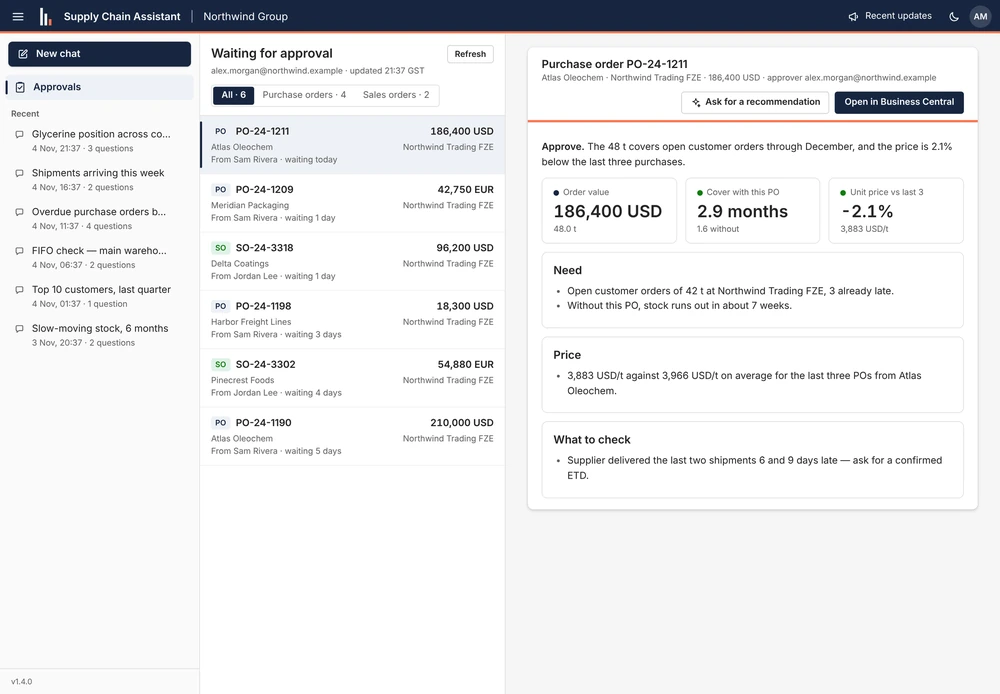
Supply Chain Assistant approval queue and selected purchase order, with its recommendation, stock cover, price comparison and supplier delivery check.
Purchase order approvalProduct screenshot · Sample dataFull screenshot
Read from the sources you agreeBusiness CentralSharePointOutlook

Worked example · Purchase order approval

Should we approve
this 48 t purchase order?

Follow one order from the approval queue to a recommendation. The screen above shows the actual assistant using sample data.

  1. 01 / The task

    Open the pending order.

    The approver selects PO-24-1211 and asks for a recommendation. The job is to decide whether the quantity and price make sense for current demand.

  2. 02 / What the assistant checks

    See the need and the price.

    The assistant brings open customer orders, stock cover and recent purchase prices into the review. The recommendation is shown beside the order.

  3. 03 / What the team does

    Check the dispatch date.

    The assistant recommends approval and flags that the supplier’s last two shipments were late. The approver confirms the dispatch date and makes the decision in Business Central.

Stock cover with the order
2.9 monthsCompared with 1.6 months without it
Unit price vs. the last three orders
2.1% lower3,883 USD/t vs. 3,966 USD/t on average
Check before deciding
Confirm dispatchThe previous two shipments were 6 and 9 days late

These figures describe the sample order shown in the product. Your team approves or posts orders in Business Central.

Inside the product

From a question
to work your team can review.

See how the workspace handles a warehouse check, passes an analysis to colleagues and starts a new question on mobile.

01 / Warehouse & quality

Find picks that skipped an older lot.

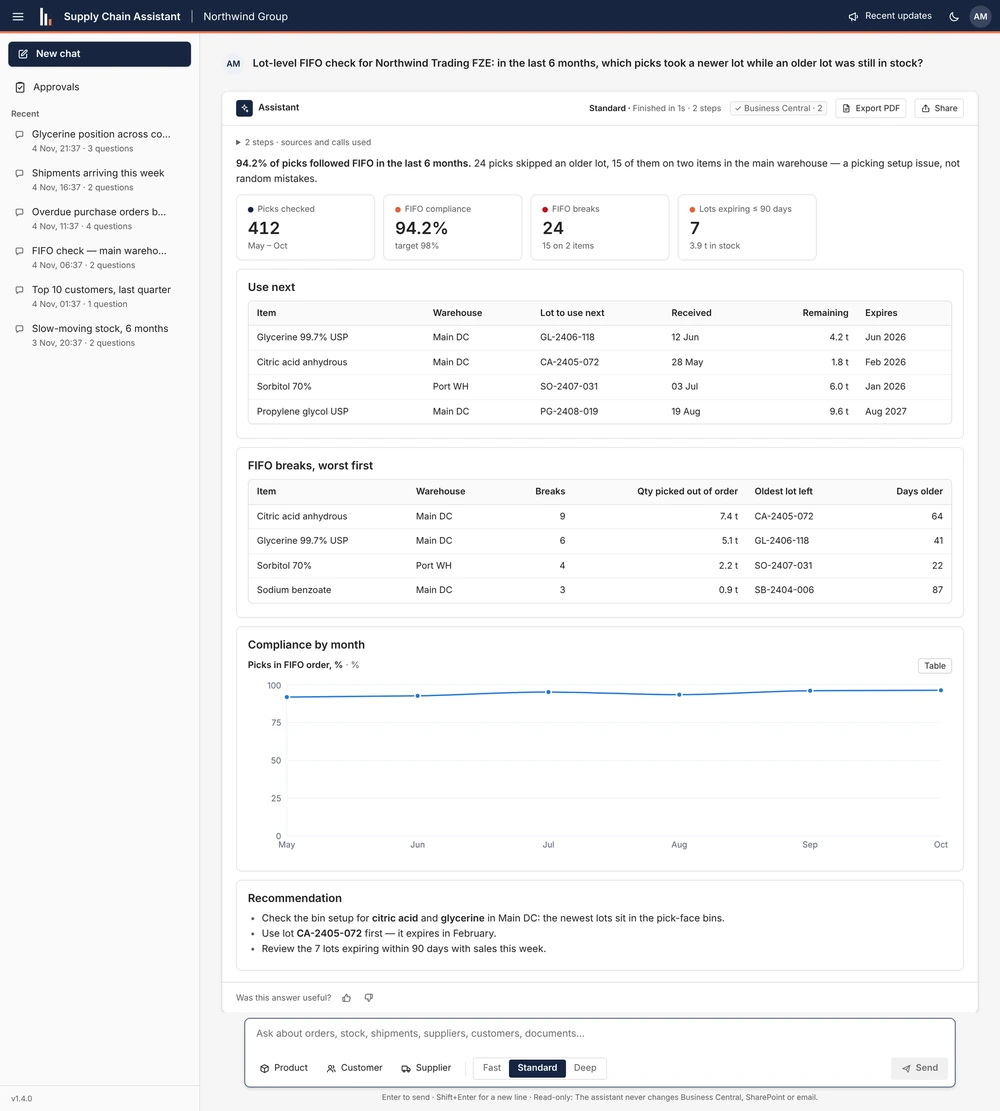
Ask which picks used newer lots while older stock was still available. The answer ranks exceptions, shows the trend over time and suggests lots to review. The warehouse team checks expiry and whether each lot is available for use before picking.

In the sample: 24 of 412 picks skipped an older lot. Fifteen exceptions were on two items, giving the team a specific place to investigate.

Assistant answer to a six-month FIFO question, showing picks that skipped older lots, lots to use next, monthly compliance and recommended checks.
Stock rotation analysisProduct screenshot · Sample dataFull screenshot

02 / Purchasing & planning

Send a colleague the analysis they need.

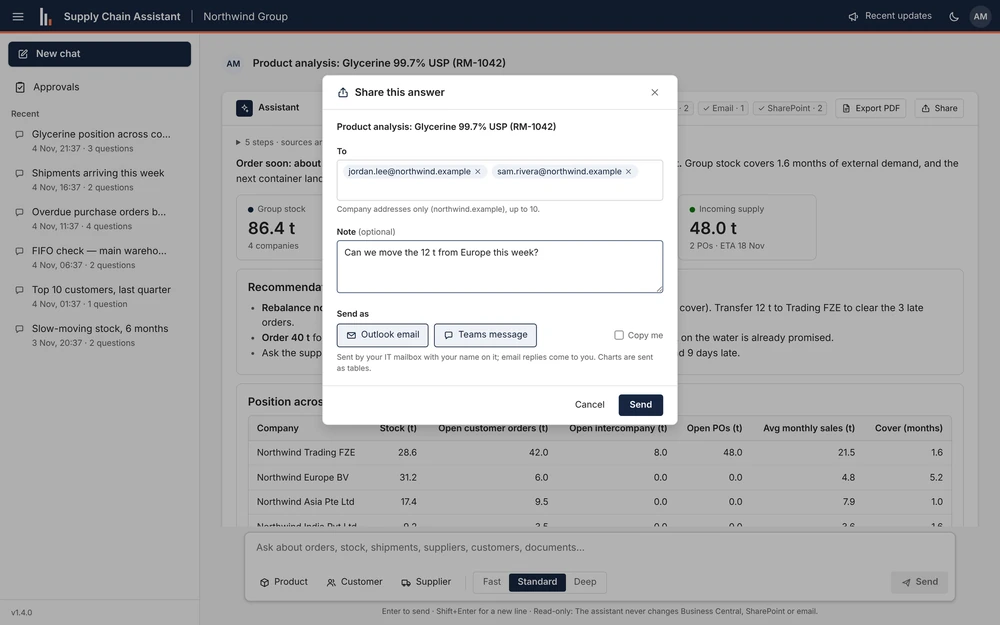
Review a product’s position across companies, then add a note and choose Outlook or Teams. The screenshot shows a draft asking whether stock can be transferred from Europe.

What stays with the user: choose the recipients, review the note and select Send.

Product analysis behind an open Share this answer dialog with recipients, an optional note, Outlook and Teams choices and a Send button.
Share a product analysisProduct screenshot · Sample dataFull screenshot

03 / Mobile workspace

Start with today’s operational question.

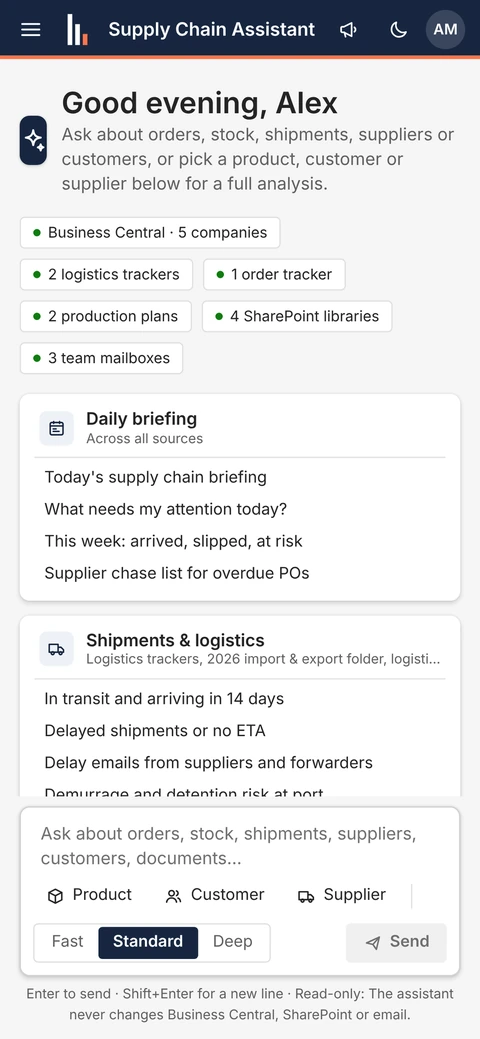
Start from a daily briefing or shipment prompt, or ask about an order, product, customer or supplier. The workspace shows the sources available for that setup.

Try in a demo: ask what is in transit, what is late or which purchase orders need a supplier follow-up.

Mobile Supply Chain Assistant workspace with connected source labels, daily briefing and logistics prompts, and a field to ask a question.
Mobile workspaceProduct screenshot · Sample dataFull screenshot

Existing solution · Configured for your team

Built around
day-to-day operations.

The assistant fits teams that regularly reconcile stock, demand, inbound supply and supplier updates. We connect the existing application to the companies and sources in scope, then configure terminology, access and checks for your business.

Founder Kemal Aljic has built transport planning software around Business Central purchase orders, shipment legs and invoice reconciliation. That experience informs the checks we discuss with purchasing, warehouse and logistics teams before a pilot.

Meet Kemal and see his background

Where it helps

Questions from each team.
A shared view of the operation.

The available analysis follows the data you connect. We confirm fields, rules and exceptions during the pilot.

Purchasing & planning

What do we have, and what should we order?

Compare stock, open demand and incoming supply across connected companies. Review coverage and order, watch or rebalance recommendations.

Logistics

What is arriving, delayed or missing?

Bring shipment trackers, supplier updates and supporting documents together. Investigate changed ETAs and missing shipping documents.

Warehouse & quality

Which lot should we use next?

Review stock ageing, expiry and lot-level FIFO or FEFO. Identify older lots that were skipped and stock that needs attention.

Sales & customer service

What can we tell this customer?

Review open orders, late lines and available supply. Prepare an answer with the assumptions behind the proposed delivery date.

Approvers & management

What needs a decision?

Review orders awaiting approval with supporting reasons. Use the approvals view and prepare a morning digest for the agreed recipients.

What you receive

The assistant,
connected and tested.

An implementation of our existing solution, with the scope and operating responsibilities agreed for your business.

How we work with your team

From demo to daily work

Start with one team.
Expand after the checks.

Review the existing assistant, then scope a pilot around your sources and questions. Timing and rollout follow the agreed scope.

  1. 01

    Scope one useful pilot

    Choose a team, a Business Central company and three to five recurring questions. Agree which answers and source checks would make the pilot useful.

  2. 02

    Connect the agreed sources

    Configure Microsoft sign-in and access to the selected ERP data, SharePoint libraries or trackers, and shared mailboxes. Review hosting and access responsibilities before connecting.

  3. 03

    Adapt it to your operation

    Configure units, warehouses, document prefixes and intercompany relationships. Prepare prompts around the questions your team actually asks.

  4. 04

    Test, then expand

    Compare answers with known records, check access boundaries and review missing or conflicting data. Agree rollout, user guidance, ongoing support and running costs.

Before you commit

Useful answers.
Clear boundaries.

Reading data, recommending an action and carrying it out are different responsibilities.

Does it change anything in Business Central?

The assistant reads source systems to analyse and explain. It does not post orders, move stock or approve documents in Business Central. Your users carry out those actions in their normal systems.

Can it send emails or Teams messages?

Sharing an answer and scheduled digests are separate from read access to source systems. We agree whether those features are included, who can use them and which destinations are allowed. A draft or recommendation is not an approved business action.

Who can see the connected information?

We agree the companies, folders and mailboxes in scope, along with the user roles and access checks. Microsoft sign-in identifies the user; the pilot must also verify what each role can retrieve. Personal mailbox access is optional and scoped separately.

Where will the app and AI run?

We set up the app in your Microsoft Azure tenant. Your proposal identifies the hosting region, AI provider, data flow, retention settings and responsibilities. We review these choices with your technical owner before connecting your systems.

How do we check the answers?

Answers show their supporting sources and analysis so your team can review them. Source links help verification; they do not guarantee the answer is correct. Test key questions against known records and confirm critical quantities, dates and approvals at the source.

Do we need Business Central?

This solution is built for Microsoft Dynamics 365 Business Central and Microsoft 365. If you use another ERP, we can assess a separate integration scope through our ERP & System Integration service.

What does setup and operation cost?

We scope setup around the companies, sources, teams and questions involved. The proposal separates implementation, hosting, AI usage and any ongoing support. Pilot duration, acceptance checks and commercial terms are agreed after reviewing your setup.

See the existing assistant

Bring the question
your team keeps chasing.

Request a demo on sample data. Tell us which Business Central companies you run, where your trackers live and what your team needs to answer.

Request a demo

The demo enquiry starts a conversation. Pilot scope and commercial terms are agreed separately.